
AI AUDIO / ANALYSIS
Splice Create: build a short soundtrack while learning the edit
Splice’s new Mac beta pairs a music workstation with voice, text and guided controls. A 20-second video cue is a manageable way to test whether the assistance teaches useful choices.
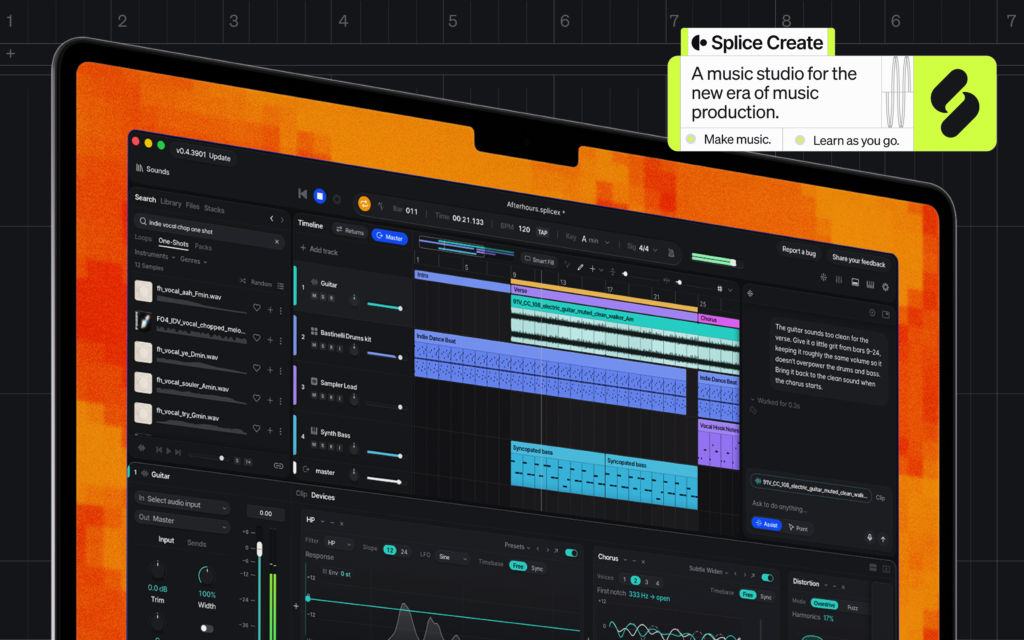
Splice introduced Create on 5 November 2026 as a music production workspace with its sample catalog, instruments and effects built in. The company says creators can use voice or text to find sounds, group drums, apply effects and handle routine tasks. Its “Point Mode” provides step-by-step guidance inside the interface. Splice says the sound catalog is made by people and fully licensed; the assistive controls are the AI layer. WASSAI has not tested the beta. For a learner making short videos, the question is whether the tool helps build a deliberate soundtrack rather than just producing something that sounds finished. [1]
Make a small cue with a real brief
Take a 20-second video you own or are allowed to edit. Mark three moments: the opening image, a change in action and the final frame. Write a one-sentence mood brief and pick a tempo that suits the cuts. Start with one rhythmic layer and one melodic or textured layer. Avoid filling every second. Leave space for dialogue, product sounds or a quiet ending if the picture needs them.
Use Create’s sound search to audition a few human-made samples, then choose by listening against the video, not by genre label alone. Splice says the app includes its royalty-free catalog, Splice INSTRUMENT and support for VST plugins. Check the rights and terms for the exact sounds, plugin instruments and final use before delivering commercial work. [1]
Ask for help, then learn the move
Try one natural-language command, such as grouping the drums or applying an effect to a single layer. Then inspect what changed on the timeline and listen to the before-and-after at the same volume. If you cannot explain why the change helps the scene, undo it. Turn on Point Mode for one unfamiliar task and repeat the step manually afterwards. The useful result is a technique you can carry into the next edit, not just a faster button press. [1]
Export two versions: one with your original arrangement and one with the assisted change. Play both under the picture on speakers and phone audio. Check whether the opening grabs attention, the middle supports the action, and the ending resolves without masking a spoken call to action. Keep notes on what you chose yourself and what the tool changed.
Know the beta boundary
Splice says Create is currently a standalone Mac beta, with Windows and web versions planned. Getting started is free, while sharing a song requires a Create Pro subscription; Splice advertises introductory pricing of $9.99 per month. Confirm current eligibility and terms before making it part of a client workflow. The app can export audio for other music workstations, which makes a small test easier to bring into an existing edit. [1]
A good pilot ends with a clean mix, a saved project and a record of the sounds used. Judge the soundtrack against the video and the rights needed for distribution. The assistance may shorten the learning curve, but taste, timing and final approval remain the creator’s work.
Sources
- Splice: Introducing Splice Create: A full DAW powered by Splice · Published 2026-11-05; checked 8 November 2026.